

GKE with Terraform
Onyx ships Terraform modules for GCP that create the Google Cloud infrastructure for Onyx. After Terraform finishes, you install Onyx with the Helm chart.The modules are a reference implementation. They show how we deploy Onyx and set sensible defaults.
Every environment is different. Fork the modules and change them for your project, network, and compliance rules.
Managed services
The
onyx module connects all of these modules. You can also use each module on its own.
Prerequisites
1
Install the tools
- Terraform
>= 1.12.0 - Google Cloud CLI (
gcloud) kubectlandhelmjq, to read a Terraform output in a later step
2
Log in to Google Cloud
Terraform uses Application Default Credentials. The account must be able to create networks, GKE clusters,
Cloud SQL, Memorystore, Cloud Storage buckets, IAM bindings, and Cloud Armor policies.
For the L7 load balancer,
it must also be able to create global addresses and Certificate Manager resources.
3
Enable two project APIs
The
onyx module enables the other project APIs it needs. It cannot enable these two,
because Terraform reads the project before the first apply. Enable them before the first terraform plan:4
Choose where Terraform runs
Terraform creates the
onyx namespace and a Kubernetes service account through the GKE API server.
Run terraform apply from an address in master_authorized_networks. If you set private_endpoint_enabled = true,
run it from inside the VPC. From any other address, the apply stops at those two resources.5
Allow OS Login (only with the OS Login policy)
If your organization enforces the
compute.managed.requireOsLogin policy, the first cluster creation fails.
The module sets no node metadata. Turn on OS Login for the project before the first terraform apply:Quickstart
This root module creates a complete Onyx stack. It uses the module from the Onyx repository at a fixed tag.main.tf
Pin the module version
GCP module releases have tags of the formtf-gcp/vX.Y.Z.
These versions are independent of the AWS modules (tf/vX.Y.Z), the Azure modules (tf-azure/vX.Y.Z),
and Onyx releases. A commit SHA also works as the ref. For automated pipelines, use a SHA, because nobody can move it.
Always set a ref. Without it, Terraform uses the default branch,
and an unrelated change can change your infrastructure.
T-shirt sizing
Thesize input sets all compute and data-plane values together. If you set an individual sizing input,
that value replaces the tier default.
Node counts are for the full pool, not for each zone.
The document index pool uses memory-optimized machines at all sizes, because OpenSearch runs on it.
The tiers size the infrastructure only. The Helm chart defaults request more CPU than one
small main node has,
so the cluster adds nodes. To set the pod resources for each tier,
see the chart’s SIZING.md.
Copy only the resources values. Its OpenSearch nodeSelector is for EKS. On GKE,
use the one in the Helm values below.
Common configuration
string
required
GCP project for all resources.
string
required
GCP region for all resources, for example
us-east1. Do not use a zone.string
default:"onyx"
Prefix for all resource names. The module adds the active Terraform workspace to it,
so one root module can manage
dev, staging, and prod.string
default:"medium"
small, medium, or large. See T-shirt sizing.string
required
Password for the Cloud SQL
postgres user. It must have at least 8 characters.
Pass it with TF_VAR_postgres_password or from a secret store.string
default:"onyx"
Database that the module creates for Onyx. Set
POSTGRES_DB to this value in the Helm values.string
default:"ZONAL"
REGIONAL adds a standby in a second zone. It costs approximately two times more.list(object)
default:"[]"
CIDR ranges that can reach the GKE API server. You must set this input,
private_endpoint_enabled,
or allow_unrestricted_api_server_access.
The module does not create an API server that is open to all addresses by accident.bool
default:"false"
Serve the GKE API server on its private address only.
bool
default:"true"
Create a Memorystore for Redis instance. Set to
false to use the Redis in the cluster.bool
default:"true"
Serve TLS on port
6378. A change to this value replaces the instance.bool
default:"true"
Create a Cloud Armor policy with the OWASP Core Rule Set, rate limits, and Adaptive Protection.
The policy protects Onyx only through the L7 load balancer.
See Serve through an L7 load balancer.
bool
default:"false"
Create a global address and Google-managed certificates for an L7 load balancer that the GKE Gateway API builds.
The Cloud Armor policy attaches to this load balancer.
See Serve through an L7 load balancer.
list(string)
default:"[]"
Hostnames that the L7 load balancer serves, for example
["onyx.example.com"].
Use lowercase hostnames with no wildcard. You must set at least one when enable_l7_ingress = true.bool
default:"true"
Set to
false to use an existing network. Then also set network_id, subnet_id, pods_range_name,
and services_range_name. The network must already have Private Service Access and Cloud NAT.bool
default:"true"
Protects the cluster, database, cache, bucket, Cloud Armor policy, and the L7 address and DNS authorizations.
Set it to
false and apply before you run terraform destroy.modules/gcp/onyx/variables.tf.
Outputs
The
l7_* outputs are null when enable_l7_ingress = false.
Install Onyx with Helm
1
Connect to the cluster
2
Install cert-manager (only for Let's Encrypt)
This step applies only to the default L4 path, where ingress-nginx terminates TLS.
The L7 load balancer uses Google-managed certificates instead,
and does not need cert-manager or Let’s Encrypt.If you set
letsencrypt.enabled: true in the Helm values, the chart creates a cert-manager ClusterIssuer.
The cert-manager CRDs must exist before you install the chart. Install cert-manager one time for each cluster:3
Create the Secrets
Terraform already created the OpenSearch reads its admin password one time, when the cluster starts for the first time.
A later change to the Secret does not change the password.
onyx namespace. Do not create it again. Create the Secrets in that namespace:4
Create the CA ConfigMaps
Memorystore serves TLS. Onyx verifies the server certificate with the Memorystore CA.
The file holds all CA certificates in the output, so a CA rotation does not stop the connection.Cloud SQL accepts only encrypted connections. Onyx encrypts by default, so PostgreSQL needs no TLS setting.
To also verify the Cloud SQL server certificate, create this ConfigMap and set
postgresTls in the next step:5
Write the Helm values
Replace each Do not set
<...> with the Terraform output of the same name.values.yaml
GCS_SERVICE_ACCOUNT_KEY_PATH or GCS_SERVICE_ACCOUNT_KEY_JSON.
Onyx then uses Application Default Credentials,
which get the Workload Identity of the onyx-workload-access service account.
The service account needs no annotation,
because IAM grants the bucket roles directly to the Kubernetes service account.6
Install the chart
Install into the Always set
onyx namespace. The service account with the bucket grant exists only in that namespace.--version. Without it, each upgrade installs the newest chart.Verify the deployment
1
Check the pods
Running. Make sure that the OpenSearch pod runs on a node of the document index pool.2
Check the API server logs
403errors from Cloud Storage: the pods do not run asonyx-workload-access, or the release is not in theonyxnamespace.- Redis connection errors:
redisTlsis not enabled, orREDIS_PORTis not6378. Missing Authority Key Identifier:postgresTlsis set on an Onyx version that cannot verify Cloud SQL. RemovepostgresTls.
3
Open Onyx
For a test, forward a local port:Then open http://localhost:8080. For this test,
set
WEB_DOMAIN to http://localhost:8080, or login redirects go to the wrong address.For public access, point a DNS record such as onyx.example.com to the external IP of the onyx-nginx Service.
This is the default L4 path.Serve through an L7 load balancer (Cloud Armor)
By default, the chart exposes Onyx through ingress-nginx behind a Service of typeLoadBalancer. On GKE,
that is an L4 pass-through load balancer. A Cloud Armor policy cannot attach to it.
If you do not attach the policy to an L7 load balancer, it protects nothing, and Google Cloud shows no error.
To put the policy in front of Onyx, serve through a global external Application Load Balancer.
The GKE Gateway API builds that load balancer. The gke module already turns on the Gateway API.
This path replaces the ingress-nginx LoadBalancer Service, cert-manager, and Let’s Encrypt for the hosts it serves.
Terraform creates the GCP resources that the Gateway uses: a global address,
and a certificate map with one Google-managed certificate for each domain. You apply the Kubernetes objects yourself.
They are CRDs, and a kubernetes_manifest of a CRD fails the plan of a new cluster.
The load balancer sends traffic to the Onyx server block of the chart’s nginx, on port 1024.
The chart’s LoadBalancer Service uses the same port. The API, web server, and MCP routes stay in nginx.
1
Turn it on in Terraform
Add these inputs and outputs to the root module:Use lowercase hostnames with no wildcard. Keep
main.tf
enable_cloud_armor on, which is the default.
Then run terraform apply. The onyx module turns on the Certificate Manager API.
If you set enable_project_apis = false, turn on that API yourself first.2
Add the DNS authorization records
CNAME named _acme-challenge.<domain>..
The record proves that you control the domain. It does not move traffic,
so the current load balancer continues to serve Onyx.3
Wait for the certificates
ACTIVE on each certificate. This usually takes minutes after the CNAME resolves,
but it can take hours when the DNS provider is slow. If a certificate stays PROVISIONING,
managed.authorizationAttemptInfo in the full output tells why.4
Apply the Kubernetes objects
Apply these objects in the release namespace. Replace each value in The Gateway takes a few minutes to program. When it is ready,
<> with the Terraform output of the same name.
The examples use the release name onyx and the namespace onyx.l7-gateway.yaml
kubectl -n onyx describe gateway onyx shows Programmed: True. Each policy shows Attached: True in its status.5
Test the new path before you move DNS
Send a request to the new address without a DNS change:
6
Tell Onyx its public URL
Onyx marks its cookies
Secure and builds its login redirects from WEB_DOMAIN.
Set it to the HTTPS address in the Helm values:values.yaml
7
Move DNS
Point the
A record of each domain at l7_ip_address.8
Remove the L4 load balancer
After the old DNS record expires from caches, nothing uses the ingress-nginx Then run
LoadBalancer.
Make it a cluster-internal Service. This removes the L4 load balancer and its public address.
Certificate Manager now serves the certificate for these hosts,
so turn off the chart’s ingress and letsencrypt too. You no longer need cert-manager for these hosts.values.yaml
helm upgrade with the new values.cloud_armor_preview = true to log rule matches without blocking requests while you tune the rules.
Notes:
- Cloud Armor sees the real client address. The rate limits count each client separately, and the IP and country rules match the client.
- When you add or remove a domain, Terraform adds or removes only the certificate of that domain. The other domains continue to serve.
deletion_protectionguards the address and the DNS authorizations. Set it tofalseand apply before you remove a domain.- If one response can stream for longer than one hour, make
timeoutSeclarger.
Run the model servers on GPUs (optional)
enable_gpu_node_pool = true adds a GPU node pool. It does not move a model server to the pool.
The pool has the taint nvidia.com/gpu=present:NoSchedule and the label onyx.app/gpu=true. To use it,
set nodeSelector, tolerations,
and an nvidia.com/gpu limit on inferenceCapability or indexCapability in the Helm values.
The default GPU pool has one node with one GPU, so give the GPU to one model server only.
Notes
- State storage. For shared or production use, store Terraform state in a
gcsbackend. - Workspaces. Resource names include the active Terraform workspace. A
name = "onyx"module in workspaceprodcreatesonyx-prodresources. - Existing network. With
create_network = false, the network must already have a Private Service Access connection. If not, Cloud SQL and Memorystore fail to create. - Database name. If you do not set
POSTGRES_DB, Onyx uses thepostgresdatabase that Cloud SQL creates, and theonyxdatabase stays empty. - Database connections.
postgres_max_connectionsdefaults to500. Make it larger if you add many API or worker replicas. A change restarts the instance. - Destroy. Set
deletion_protection = falseand apply before you runterraform destroy.
Compute Engine VM
Make sure that your Google Cloud account can create a VM instance.1
Create a VM instance
Create a VM instance with the appropriate resources. For this guide,
we will use the recommended 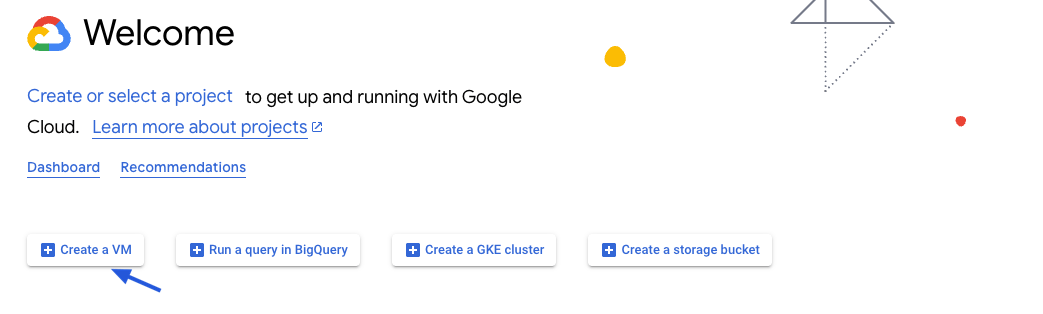
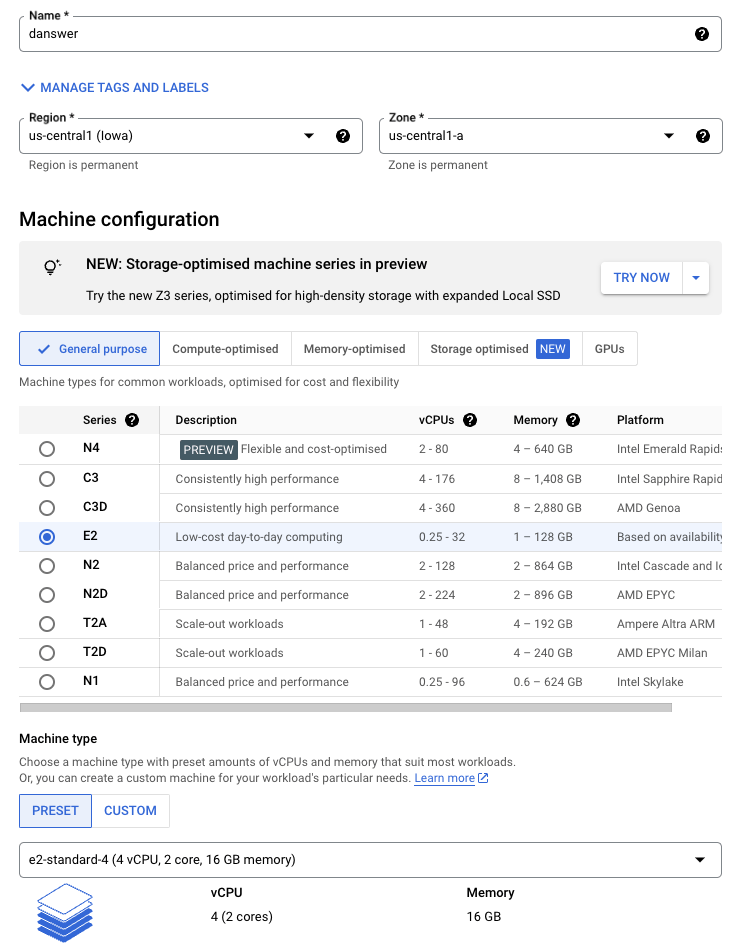
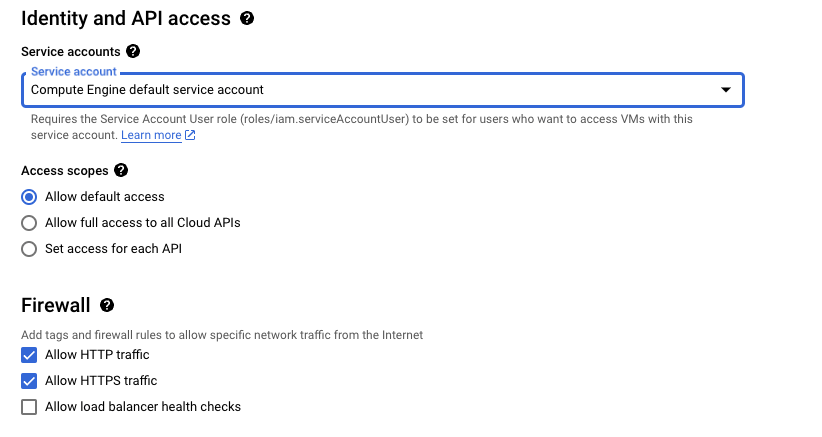
e2-standard-4 instance.Read our Resourcing guide for more details.
- Give your instance a descriptive name like
onyx-prod - Select the
Debian GNU/Linux 12boot disk - Select the
e2-standard-4machine type - Select
Allow HTTPS trafficin the Firewall section - Configure storage following the Resourcing Guide
2
Create the instance
Click Create and then view your instance details.
3
Point domain to the instance
If you don’t have a domain, buy one from a DNS provider like GoDaddy
or just skip HTTPS for now.
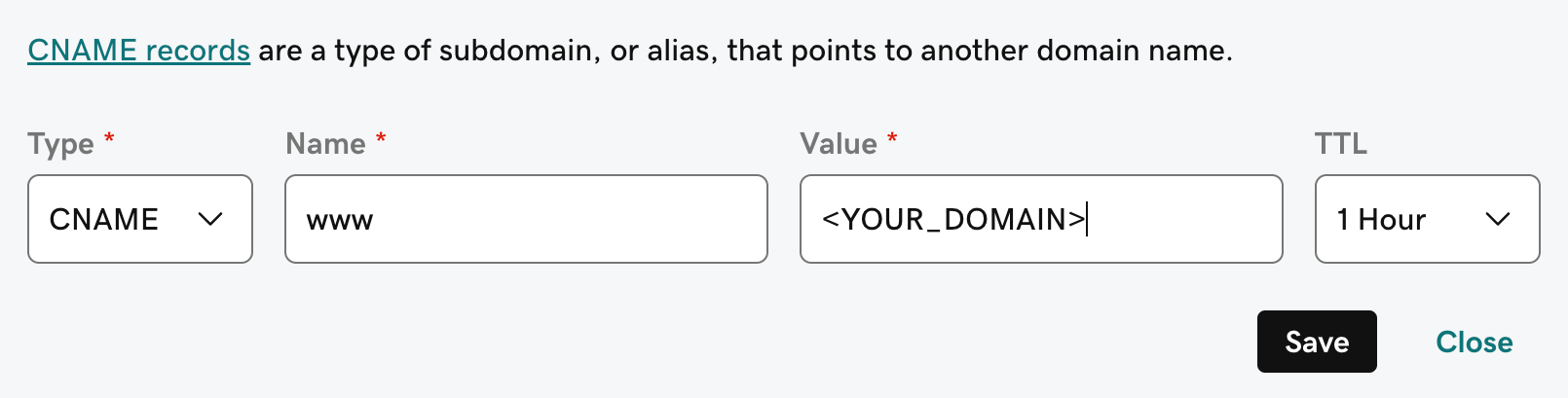
A and CNAME record to our DNS provider.The A record should be the subdomain that you would like to use for the Onyx instance like prod.The CNAME record should be the same name with the www. in front resulting in www.prod pointing to the full
domain like prod.onyx.app.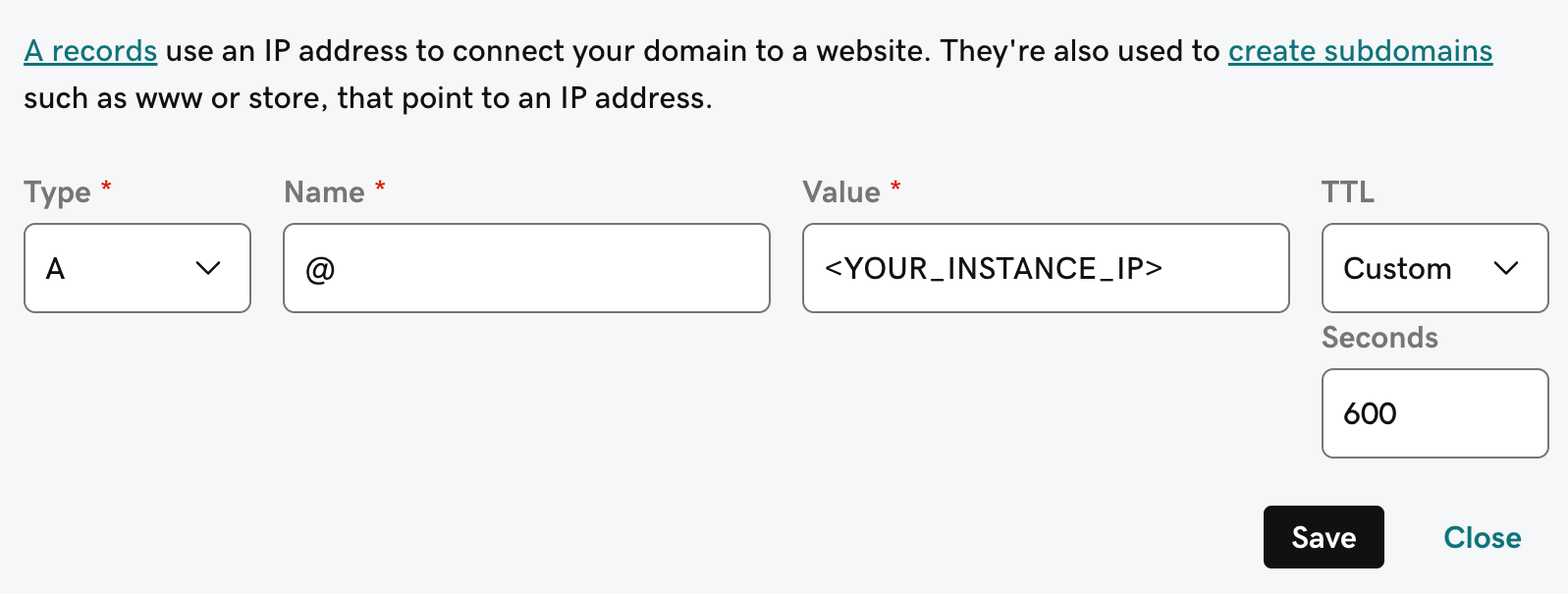
4
Install Onyx requirements
Onyx requires If you use Rocky Linux, RHEL, or a similar image, run the following:To run
git, docker, and docker compose.To install these on Debian GNU/Linux 12, run the following:docker without sudo, add your user to the docker group. Then log out and log in again:5
Install and Configure Onyx
To install Onyx, we’ll need to clone the repo and set the necessary environment variables.Fill out the Email/password login works out of the box, and SSO (Google / OIDC / SAML) is configured later from the admin panel.
See our auth guides for details.
.env and .env.nginx files..env
.env.nginx
6
Launch Onyx
Running the If you are skipping the HTTPS setup, start Onyx manually:You can access Onyx from the instance Public IPv4 or from the domain you set up earlier!
init-letsencrypt.sh script will get us a SSL certificate from letsencrypt and launch the Onyx stack.Give Onyx a few minutes to start up.You can monitor the progress with
docker logs onyx-stack-api_server-1 -f.Next Steps
Configure Authentication
Set up authentication for your Onyx deployment with OAuth, OIDC, or SAML.
More Onyx Configuration Options
Learn about all available configuration options for your Onyx deployment.