> ## Documentation Index
> Fetch the complete documentation index at: https://danswer-docs-versions-opensearch-example.mintlify.site/llms.txt
> Use this file to discover all available pages before exploring further.
# Web
> Index public or internal web pages by crawling them
The Web connector reads web pages and indexes their text. It opens each page in a real browser,
so pages that build their content with JavaScript are indexed the same as static ones.
The connector signs in to nothing. It reads only what a signed-out visitor can reach.
## How it works
| Content | Behavior |
| - | - |
| Pages | One document per page. Onyx strips navigation, headers and footers, and keeps the page title as the document name. |
| PDFs | A linked PDF is downloaded and its text extracted. The document is named after the last segment of its URL. |
| Links | In **recursive** mode, Onyx follows the links it finds in each page it renders, and keeps following them until it runs out of pages that are in scope. |
| Scope | Only pages on the same site and under the same path as the base URL. See [Crawl scope](#crawl-scope). |
| Duplicates | Pages that produce the same title and text as a page already indexed this run are skipped. A URL that redirects is stored under the address it ends at. |
| Permissions | **Auto Sync Permissions** is not available for this connector. A crawled page carries no per-user access list, so the [access type](/admins/connectors/overview#document-access-controls) can only be **Public** or **Private**. |
Every refresh re-crawls the whole site; there is no incremental mode.
Onyx deliberately ignores the `Last-Modified` header,
because CDN and server-rendered origins advance it on every fetch even when the page has not changed.
Instead it compares the text of each page it fetched, so an unchanged page costs a fetch but is not re-indexed.
Because a full crawl is expensive, this connector refreshes once every 24 hours rather than every 10 minutes.
## Before you begin
You need:
* A URL the Onyx server itself can reach
* Pages that do not require signing in
* An Onyx administrator account
The connector cannot sign in, send a cookie, or answer a login form.
If the content you want sits behind authentication,
index the system that holds it with its own connector instead of crawling its web front end.
## Configure Onyx
In Onyx, go to **Admin Panel → Add Connector** and select **Web**.
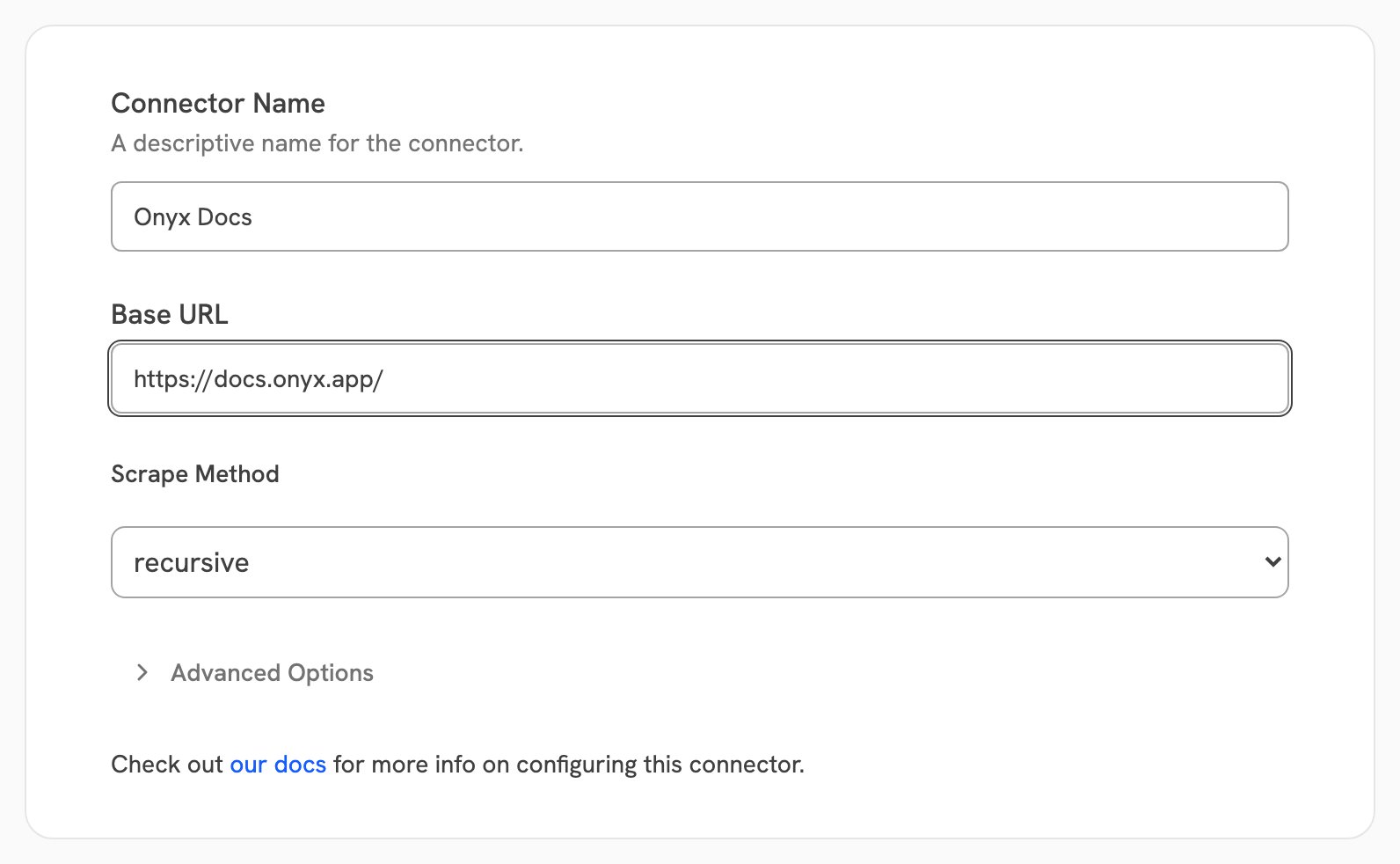
Give the connector a descriptive **Connector Name**. In **Base URL**, enter the address to start from,
for example `https://docs.onyx.app/`. If you leave off the scheme, Onyx adds `https://`.
Pick how Onyx finds pages:
* **recursive**: start at the base URL and follow every in-scope link. Use this for a whole site or section.
* **single**: index the base URL only, and follow nothing.
* **sitemap**: read a `sitemap.xml` and index every URL listed in it. If the address you give is not a
sitemap, Onyx looks for one on that site.
 **Public** makes the indexed pages visible to every Onyx user.
**Private** limits the connector to selected Onyx user groups, and is a paid feature:
the Business and Enterprise tiers on Onyx Cloud, and the Enterprise Edition when self-hosted.
See [Document Access Controls](/admins/connectors/overview#document-access-controls)
for what each access type means and which connectors support permission syncing.
Select **Create Connector**. Then open **Admin Panel → Existing Connectors**, select the connector,
and confirm its first indexing attempt completes with the page count you expect.
With **single**, Onyx fetches the page while you save the connector,
so a wrong address or a blocked page is reported straight away.
With **recursive** and **sitemap** only the address itself is checked when you save.
Everything else surfaces on the first indexing attempt.
### Advanced settings
| Setting | Default | Purpose |
| - | - | - |
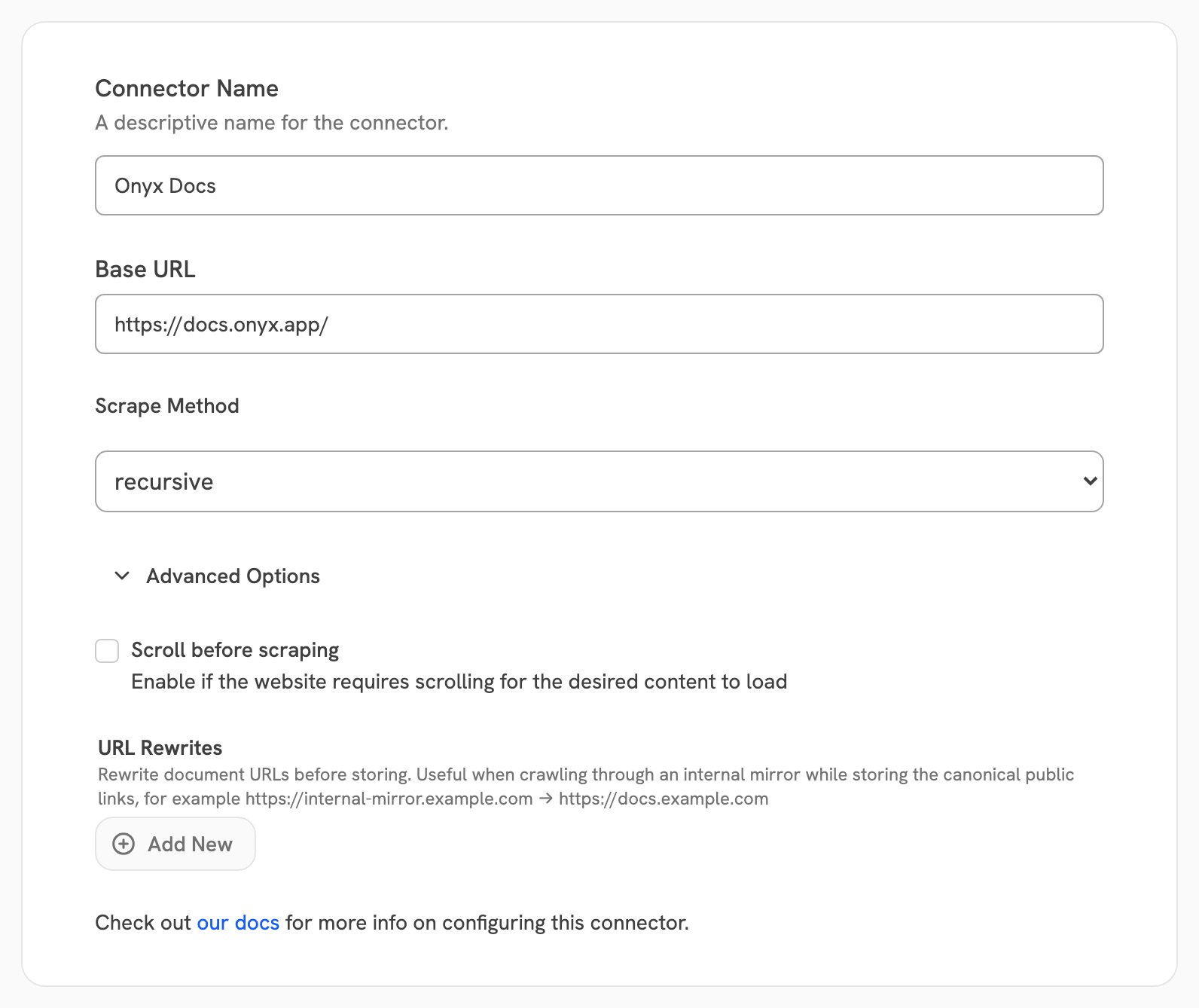
| Scroll before scraping | off | Scroll to the bottom of each page before reading it, up to 20 times, stopping when the page stops growing. Turn this on for pages that load their content as you scroll. |
| URL Rewrites | empty | Replace the start of each document's address before storing it. See [URL rewrites](#url-rewrites). |
Select **Advanced Options** on the connector form to reach both:
**Public** makes the indexed pages visible to every Onyx user.
**Private** limits the connector to selected Onyx user groups, and is a paid feature:
the Business and Enterprise tiers on Onyx Cloud, and the Enterprise Edition when self-hosted.
See [Document Access Controls](/admins/connectors/overview#document-access-controls)
for what each access type means and which connectors support permission syncing.
Select **Create Connector**. Then open **Admin Panel → Existing Connectors**, select the connector,
and confirm its first indexing attempt completes with the page count you expect.
With **single**, Onyx fetches the page while you save the connector,
so a wrong address or a blocked page is reported straight away.
With **recursive** and **sitemap** only the address itself is checked when you save.
Everything else surfaces on the first indexing attempt.
### Advanced settings
| Setting | Default | Purpose |
| - | - | - |
| Scroll before scraping | off | Scroll to the bottom of each page before reading it, up to 20 times, stopping when the page stops growing. Turn this on for pages that load their content as you scroll. |
| URL Rewrites | empty | Replace the start of each document's address before storing it. See [URL rewrites](#url-rewrites). |
Select **Advanced Options** on the connector form to reach both:
 ## Crawl scope
In **recursive** mode,
Onyx follows a link only when it stays on the same site **and** under the same path as the base URL.
A leading `www.` is ignored when comparing sites.
| Base URL | Indexed | Not indexed |
| - | - | - |
| `https://example.com/` | anything on `example.com` | `https://docs.example.com/`, any other site |
| `https://example.com/docs` | `/docs`, `/docs/setup`, `/docs/api/auth` | `/blog`, `/documentation` |
This is the most common reason a recursive crawl indexes fewer pages than expected.
A site whose sections live on separate subdomains needs one connector per subdomain.
A site whose pages are only reachable from a search box, and never linked, needs the **sitemap** method instead.
## URL rewrites
A rewrite replaces the start of a document's stored address.
Onyx still fetches the original address — only the link saved on the document changes,
which is the link a user follows from a citation.
Use it when Onyx reaches a site by an address your users do not use, for example an internal gateway:
| Source URL prefix | Replacement prefix |
| - | - |
| `http://wiki.internal:8080/` | `https://wiki.example.com/` |
The first matching rule wins. If two crawled pages rewrite to the same address,
Onyx keeps the first and skips the second, because the two would otherwise overwrite each other in the index.
## Crawling an internal site
Self-hosted only. By default Onyx refuses to crawl private or internal addresses,
and a connector pointed at one fails with `Non-global IP address detected`.
To allow it,
an admin sets **SSRF Protection** to **Validate LLM Requests** or lower on the [Security &
Hardening](/admins/advanced_configs/security_hardening) page. At that level,
connectors an admin configured may reach private addresses, while fetches started by the LLM stay validated.
Onyx Cloud cannot reach addresses inside your network at any setting.
## Limits
The connector has no file-size cap, unlike the SharePoint and Google Drive connectors. A linked PDF is downloaded whole.
The limits that do apply are times and counts:
| Limit | Value | Notes |
| - | - | - |
| Page load | 30s | A page that does not respond in time is retried, then skipped. |
| Render and bot-challenge wait | 5s | Time allowed after load for JavaScript content or a bot check to settle. |
| PDF download and content check | 60s | Set `REQUEST_TIMEOUT_SECONDS` to change it. This is a global setting, not specific to this connector. |
| Retries per page | 3 | Backed off between attempts, up to 10s. |
| Scroll attempts per page | 20 | Only with **Scroll before scraping** on. Stops early once the page stops growing. |
A slow page that exceeds the load timeout on all 3 attempts is dropped from the crawl and recorded as an error,
rather than indexed with partial content.
## Troubleshooting
| Message or symptom | Cause and fix |
| - | - |
| Far fewer pages than expected | The pages are out of scope. Check the base URL against [Crawl scope](#crawl-scope): a path in the base URL limits the crawl to that path, and a different subdomain is a different site. Pages that nothing links to are never found in **recursive** mode — use **sitemap**. |
| `No valid pages found.` | Nothing was indexed at all. The base URL is wrong, every page was blocked, or a sitemap listed no URLs. |
| `Non-global IP address detected` | The address resolves inside your network. See [Crawling an internal site](#crawling-an-internal-site). |
| The page text says JavaScript is disabled | The content sits in an iframe. Onyx already reads iframe text when it sees this message; if the result is still thin, the site is likely blocking automated browsers. |
| Pages are empty or missing their main content | The content loads as you scroll. Turn on **Scroll before scraping**. |
| `Forbidden (403)` or a challenge page | Bot protection. Onyx waits for the challenge and retries each page up to 3 times, but a site that requires a solved challenge cannot be crawled. Ask the site owner to allow the Onyx server. |
| `SSL error` | The certificate is expired, self-signed, or missing an intermediate. Fix it on the site; the connector does not skip certificate checks. |
| `No URLs found in sitemap` | The address is not a sitemap and none was found for the site. Use **single** or **recursive** instead. |
| Every refresh re-reads the whole site | Expected. There is no incremental mode. Unchanged pages are fetched but not re-indexed. |
| Pages need a login | Not supported. Index the underlying system with its own connector. |
This documentation is built and hosted on [Mintlify](https://mintlify.com), a developer documentation platform.
## Crawl scope
In **recursive** mode,
Onyx follows a link only when it stays on the same site **and** under the same path as the base URL.
A leading `www.` is ignored when comparing sites.
| Base URL | Indexed | Not indexed |
| - | - | - |
| `https://example.com/` | anything on `example.com` | `https://docs.example.com/`, any other site |
| `https://example.com/docs` | `/docs`, `/docs/setup`, `/docs/api/auth` | `/blog`, `/documentation` |
This is the most common reason a recursive crawl indexes fewer pages than expected.
A site whose sections live on separate subdomains needs one connector per subdomain.
A site whose pages are only reachable from a search box, and never linked, needs the **sitemap** method instead.
## URL rewrites
A rewrite replaces the start of a document's stored address.
Onyx still fetches the original address — only the link saved on the document changes,
which is the link a user follows from a citation.
Use it when Onyx reaches a site by an address your users do not use, for example an internal gateway:
| Source URL prefix | Replacement prefix |
| - | - |
| `http://wiki.internal:8080/` | `https://wiki.example.com/` |
The first matching rule wins. If two crawled pages rewrite to the same address,
Onyx keeps the first and skips the second, because the two would otherwise overwrite each other in the index.
## Crawling an internal site
Self-hosted only. By default Onyx refuses to crawl private or internal addresses,
and a connector pointed at one fails with `Non-global IP address detected`.
To allow it,
an admin sets **SSRF Protection** to **Validate LLM Requests** or lower on the [Security &
Hardening](/admins/advanced_configs/security_hardening) page. At that level,
connectors an admin configured may reach private addresses, while fetches started by the LLM stay validated.
Onyx Cloud cannot reach addresses inside your network at any setting.
## Limits
The connector has no file-size cap, unlike the SharePoint and Google Drive connectors. A linked PDF is downloaded whole.
The limits that do apply are times and counts:
| Limit | Value | Notes |
| - | - | - |
| Page load | 30s | A page that does not respond in time is retried, then skipped. |
| Render and bot-challenge wait | 5s | Time allowed after load for JavaScript content or a bot check to settle. |
| PDF download and content check | 60s | Set `REQUEST_TIMEOUT_SECONDS` to change it. This is a global setting, not specific to this connector. |
| Retries per page | 3 | Backed off between attempts, up to 10s. |
| Scroll attempts per page | 20 | Only with **Scroll before scraping** on. Stops early once the page stops growing. |
A slow page that exceeds the load timeout on all 3 attempts is dropped from the crawl and recorded as an error,
rather than indexed with partial content.
## Troubleshooting
| Message or symptom | Cause and fix |
| - | - |
| Far fewer pages than expected | The pages are out of scope. Check the base URL against [Crawl scope](#crawl-scope): a path in the base URL limits the crawl to that path, and a different subdomain is a different site. Pages that nothing links to are never found in **recursive** mode — use **sitemap**. |
| `No valid pages found.` | Nothing was indexed at all. The base URL is wrong, every page was blocked, or a sitemap listed no URLs. |
| `Non-global IP address detected` | The address resolves inside your network. See [Crawling an internal site](#crawling-an-internal-site). |
| The page text says JavaScript is disabled | The content sits in an iframe. Onyx already reads iframe text when it sees this message; if the result is still thin, the site is likely blocking automated browsers. |
| Pages are empty or missing their main content | The content loads as you scroll. Turn on **Scroll before scraping**. |
| `Forbidden (403)` or a challenge page | Bot protection. Onyx waits for the challenge and retries each page up to 3 times, but a site that requires a solved challenge cannot be crawled. Ask the site owner to allow the Onyx server. |
| `SSL error` | The certificate is expired, self-signed, or missing an intermediate. Fix it on the site; the connector does not skip certificate checks. |
| `No URLs found in sitemap` | The address is not a sitemap and none was found for the site. Use **single** or **recursive** instead. |
| Every refresh re-reads the whole site | Expected. There is no incremental mode. Unchanged pages are fetched but not re-indexed. |
| Pages need a login | Not supported. Index the underlying system with its own connector. |
This documentation is built and hosted on [Mintlify](https://mintlify.com), a developer documentation platform.